
When managing a website, tracking performance through analytics and search tools is essential. However, many site owners and beginners fall into traps that hinder their organic growth. Recognizing and rectifying Google Search Console mistakes is the first step toward reclaiming your lost traffic and boosting your site visibility.
Search engines evolve rapidly, and staying ahead requires meticulous configuration and regular auditing. Let us dive deep into the most common pitfalls you need to avoid this year.
1. Failing to Complete Proper Setup and Verification
One of the most frequent blunders beginners make involves skipping crucial validation steps right at the beginning. Following a proper Google Search Console setup guide ensures that all your properties, whether domain-level or URL-prefix, are correctly verified and linked.
When you rush through this phase, tracking data can become fragmented. For instance, failing to combine HTTP and HTTPS versions or neglecting the www and non-www variations creates duplicate data reports. Taking the time to configure your property correctly protects you from inaccurate analytics down the line.
2. Ignoring Indexing and Coverage Reports
Your content cannot rank if search engine crawlers cannot index it. Many webmasters completely ignore the indexing tab until a massive traffic drop occurs. Neglecting these areas often leads to unattended server errors, blocked resources, and accidental noindex tags left active from development phases.
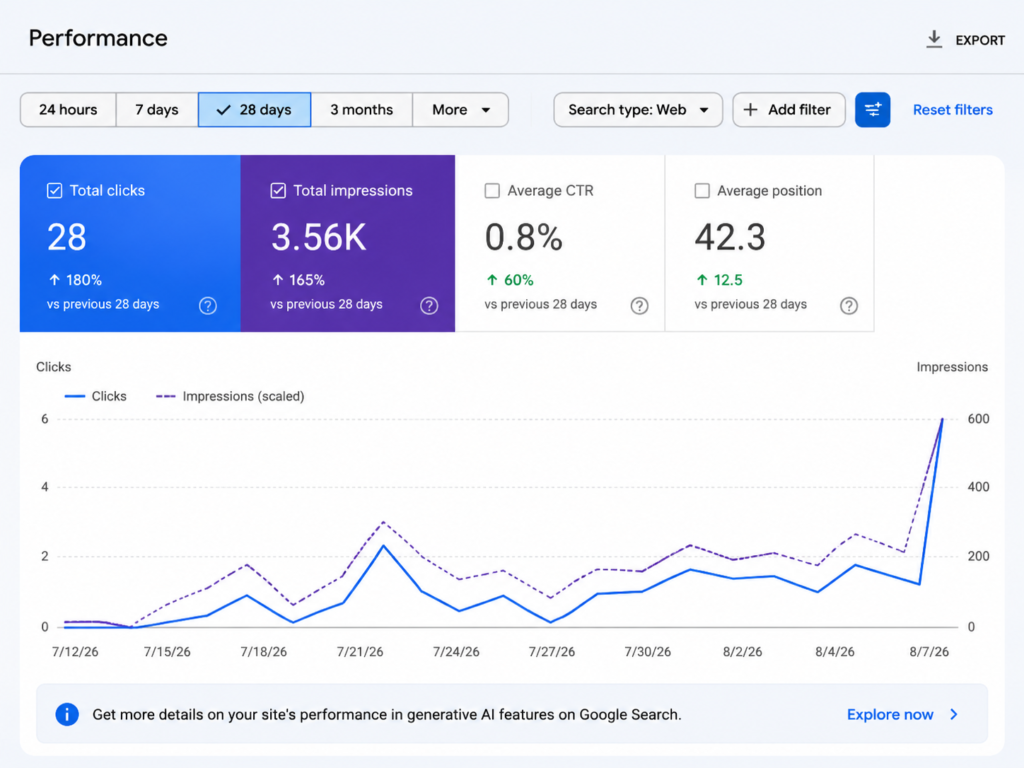
Why Crawl Errors Matter
If spiders encounter blocks while scanning your pages, your newest articles will remain invisible to searchers. Routine maintenance helps you fix Google Search Console issues before they negatively impact your overall domain authority and user experience.
3. Overlooking Mobile Usability and Core Web Vitals
With mobile traffic dominating the digital landscape, failing to monitor mobile usability is a critical error. Google heavily prioritizes user experience metrics. If your layout breaks on smartphones or your pages load too slowly, your rankings will suffer regardless of your content quality.
- Check your layout shifts and interactivity metrics regularly.
- Ensure text sizes remain legible without pinching or zooming.
- Resolve structural warnings highlighted within the performance reports.
4. Neglecting Sitemap Submission and Updates
Your sitemap acts as a roadmap for search engine crawlers. Publishing content without updating or submitting your XML sitemap forces crawlers to discover your pages purely by chance.
Always ensure your sitemap status reads as successful. Whenever you restructure your site or launch a new sub-domain, refreshing this file accelerates discovery and indexing for your fresh articles.
5. Misinterpreting Data and Chasing Vanity Metrics
It is easy to get overwhelmed by raw numbers. Looking solely at total impressions without evaluating click-through rates (CTR) or average positions can skew your marketing strategy.
Focusing on Actionable Insights
Instead of stressing over high impressions for irrelevant terms, focus on optimizing queries where you rank between positions 5 and 20. Moving those pages up yields immediate traffic gains. Avoiding these Google Search Console mistakes ensures your optimization efforts target metrics that actually convert.
6. Disregarding Security and Manual Actions
Security warnings and manual penalties can wipe out months of hard work overnight. Some site owners fail to check the “Security & Manual Actions” section, remaining completely unaware of malware injections, hacking attempts, or unnatural link profiles.
- Check your security tab monthly for any malicious code alerts.
- Address any flagged spam or structured data issues immediately.
- Keep your WordPress core, themes, and plugins updated to prevent vulnerabilities.
7. Falling Into General Optimization Traps
Beyond tool-specific errors, webmasters often commit common SEO errors to avoid such as keyword stuffing, creating thin content, or ignoring internal linking structures. Search Console provides insights into which pages lack internal links or suffer from poor engagement metrics.
By cross-referencing your Search Console data with your content strategy, you can patch up weak spots and strengthen your internal architecture.
8. Key Benefits of Monitoring and Avoiding Pitfalls
Proactively managing your website performance data brings incredible long-term advantages. By carefully identifying and correcting Google Search Console mistakes, you open the door to sustained organic traffic growth and better search engine visibility. One major benefit is the ability to catch technical errors, indexing blocks, and tracking failures before they severely impact your rankings. Furthermore, when you actively steer clear of these recurring Google Search Console mistakes, your website gains a healthier link architecture, faster indexing times, and improved overall SEO health that drives consistent visitors to your pages.
Q: What are the most common Google Search Console mistakes that harm SEO?
Answer: Ignoring indexing coverage reports, failing to verify proper property versions, and misinterpreting data are among the top Google Search Console mistakes that can heavily damage your website’s organic visibility and search rankings.
2. Q: How can I perform a proper Google Search Console setup guide for a new website?
Answer: To follow a complete Google Search Console setup guide, you need to add your domain or URL-prefix property, verify ownership via DNS or HTML tags, and immediately submit your XML sitemap for faster crawling.
3. Q: What are the typical common SEO errors to avoid during on-page optimization?
Answer: Some of the most common SEO errors to avoid include keyword stuffing, neglecting internal link structures, publishing thin content, and failing to optimize your title tags and meta descriptions properly.
4. Q: What is the easiest way to fix Google Search Console issues regarding indexing?
Answer: You can quickly fix Google Search Console issues by checking the Coverage or Indexing report, inspecting blocked URLs using the URL inspection tool, and requesting re-indexing after resolving server or code errors.
5. Q: How often should a webmaster review their coverage report to prevent tracking errors?
Answer: It is recommended to check your performance and coverage metrics at least once a week to catch any sudden drops or Google Search Console mistakes early before they impact your site traffic.
6. Q: Why is tracking mobile usability important for avoiding Google Search Console mistakes?
Answer: Since search engines prioritize mobile-first indexing, failing to monitor responsiveness can lead to severe Google Search Console mistakes caused by broken layouts, slow page loads, or unreadable text on smartphones.
Conclusion
Mastering search analytics takes time, patience, and continuous monitoring. By steering clear of these common Google Search Console mistakes, you safeguard your digital assets against sudden algorithmic penalties and tracking blind spots.
Make it a weekly habit to check your indexing status, review your queries, and fix Google Search Console issues proactively. With a clean setup and a disciplined approach, your website will be well-positioned for sustainable growth and higher search engine rankings throughout the year.